

Odoo 19 Sales

 by Uzlifat Mir
What’s New in Odoo 19 Sales: 3 Small Tweaks With Big Payoffs
Odoo 19 lands with a smarter quoting experience that’s cleaner for customers and faster for sales teams. Below, I break down three specific updates in the Sales app that directly impact how you present pricing on quotations and orders: per-item price hiding (via sections), sub-sections for structure, and section-level price masking that shows only the section total. Every point below is grounded in Odoo’s v19 release materials and docs.
1) Hide prices for specific items on a quote
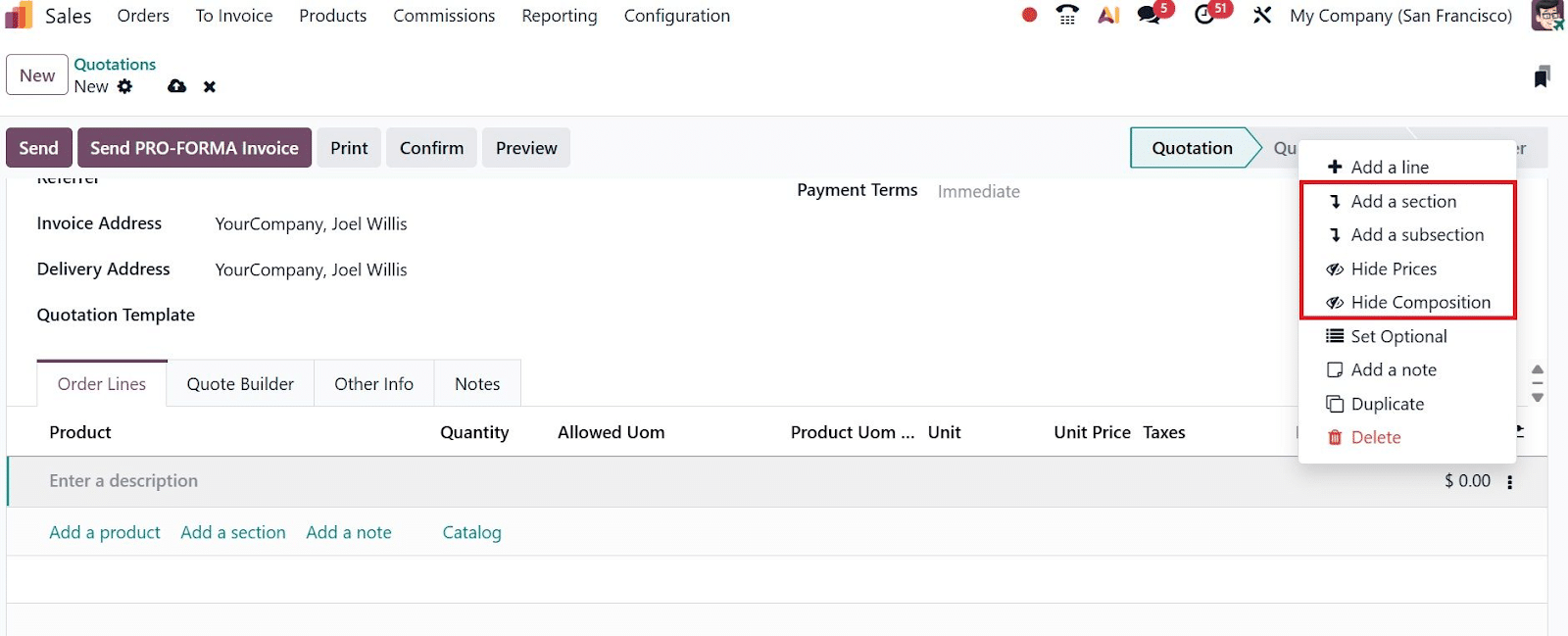
In Odoo 19, customer documents, such as quotations and sales orders, support section controls that let you hide the prices and taxes of the lines inside a section. Practically, that means you can place any single product into its own section and conceal that line’s unit price from the customer while still listing the item. The customer sees the item name, but not the line price.
Why it matters: You can present components that shouldn’t expose unit pricing yet still keep them documented on the offer, improving negotiation flexibility and reducing back-and-forth.
2) Sub-sections for better organization
Quotations can now be structured with sections and sub-sections. This lets you nest content, mirror the way your solution is packaged, and keep long quotes readable. Reordering, duplicating, and deleting sections is straightforward, so you can reshape a proposal quickly during sales cycles.
Why it matters: A Clear hierarchy makes complex proposals digestible. Customers can scan by workstream or package, reducing confusion and speeding approvals.
3) Show only the section total and hide all line-level pricing in that section
Beyond hiding the prices of the lines within a section, Odoo 19 also allows you to completely hide a section’s content and all of its lines on the produced document, effectively exposing only the section-level pricing to the customer. This is perfect for packaged bundles or fixed-fee work where line detail would distract from the value proposition.
Why it matters: You can sell outcomes rather than parts. Customers get a single number for a bundle, while your internal view still retains the granular lines for delivery and cost tracking.
What these “small” updates mean
- Cleaner customer experience: Customers see exactly what they need to approve, not a confusing list of products and pricing.
- Sales agility: Reuse structure across templates, hide or reveal prices per section, and tweak presentation without custom development.
- Operational clarity: Your team still keeps full internal line detail for fulfillment and accounting while controlling what the customer sees.
Adopting Odoo 19’s latest features can transform how your sales team engages with prospects and clients, but tailoring these tools to your business processes often requires expert guidance. That’s where Bista Solutions comes in.
As a top Odoo Gold Partner with years of implementation experience, our team has helped businesses across industries streamline operations, customize workflows, and maximize ROI from Odoo. Whether you’re looking to set up Odoo 19 from scratch, upgrade from an earlier version, or train your team on the new Sales app features, Bista Solutions can support you every step of the way.
Contact Bista Solutions to explore how Odoo 19 can elevate your sales process. Our consultants will help you configure quoting, pricing, and section management in ways that align perfectly with your business goals.
